Practical SEM Image Analysis for Biomaterials Research
Contents / 目录
Why Automate SEM Analysis?
Manual measurement of fiber diameters and orientations from SEM images is tedious, subjective, and irreproducible. A Python script does it consistently in seconds per image. This guide uses scikit-image, a library purpose-built for scientific image analysis.
import numpy as np
import matplotlib.pyplot as plt
from skimage import io, filters, measure, morphology, feature
The Analysis Pipeline
Step 1: Load and Preprocess
# Load SEM image (8-bit or 16-bit TIFF)
img = io.imread("sem_fiber_network.tif", as_gray=True)
print(f"Image shape: {img.shape}, range: [{img.min():.0f}, {img.max():.0f}]")

# Normalize to 0-1
img_norm = (img - img.min()) / (img.max() - img.min())

# Denoise with Gaussian filter
from scipy.ndimage import gaussian_filter
img_denoised = gaussian_filter(img_norm, sigma=1.0)
Step 2: Thresholding
Choosing the right threshold method is critical:
methods = {
    "Otsu": filters.threshold_otsu(img_denoised),
    "Li": filters.threshold_li(img_denoised),
    "Yen": filters.threshold_yen(img_denoised),
}

# Otsu is usually best for bimodal fiber/background images
thresh = methods["Otsu"]
binary = img_denoised > thresh

# Verify: fibers should be white (True), background black (False)
print(f"Fiber coverage: {binary.mean()*100:.1f}%")
Step 3: Clean the Binary Mask
# Remove small noise objects (< 50 pixels)
cleaned = morphology.remove_small_objects(binary, min_size=50)

# Close small gaps in fibers
selem = morphology.disk(2)
closed = morphology.binary_closing(cleaned, selem)

# Skeletonize for orientation analysis
skeleton = morphology.skeletonize(closed)
Step 4: Measure Fiber Properties
# Label connected regions
labels = measure.label(closed)
props = measure.regionprops_table(labels, properties=[
    "area", "perimeter", "eccentricity", "orientation",
    "major_axis_length", "minor_axis_length",
    "solidity", "extent"
])
import pandas as pd
df_fibers = pd.DataFrame(props)

# Fiber diameter = minor_axis_length (approximate)
df_fibers["diameter_px"] = df_fibers["minor_axis_length"]
df_fibers["aspect_ratio"] = (df_fibers["major_axis_length"] /
                               df_fibers["minor_axis_length"])

print(f"Found {len(df_fibers)} fiber segments")
print(f"Mean diameter: {df_fibers['diameter_px'].mean():.1f} +/- {df_fibers['diameter_px'].std():.1f} px")
print(f"Mean aspect ratio: {df_fibers['aspect_ratio'].mean():.2f}")
Step 5: Orientation Analysis
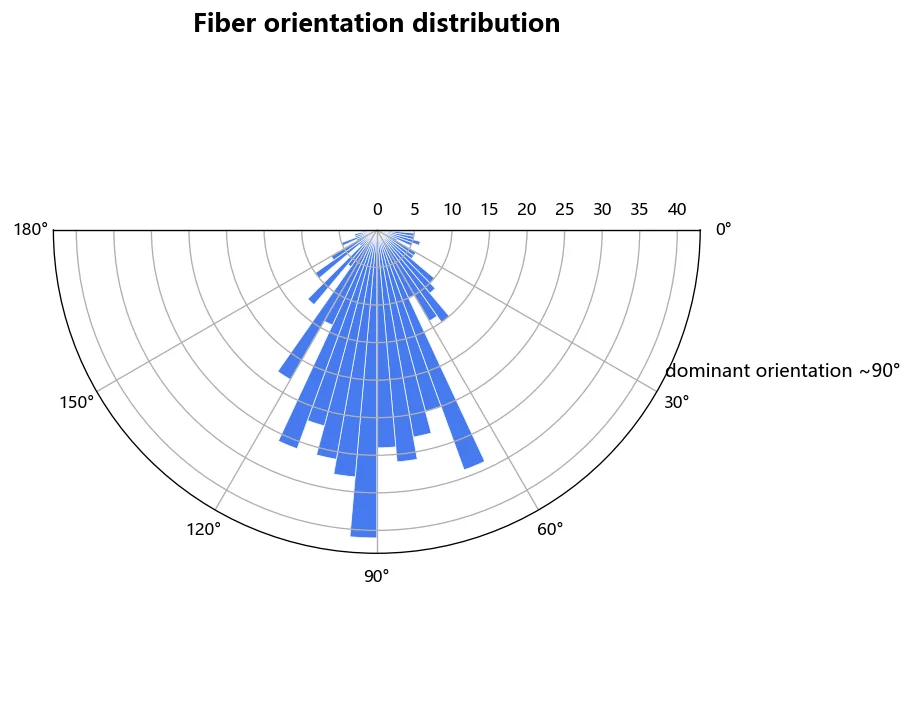
from skimage.transform import radon

# Radon transform for orientation distribution
theta = np.linspace(0., 180., max(img.shape), endpoint=False)
sinogram = radon(skeleton, theta=theta)

# Sum across each angle
orientation_profile = sinogram.sum(axis=0)

# Find dominant orientation
dominant_angle = theta[np.argmax(orientation_profile)]
print(f"Dominant fiber orientation: {dominant_angle:.1f} degrees")
Step 6: Batch Processing
import glob
from pathlib import Path

def batch_analyze_sem(image_dir, scale_nm_per_px=10.0):
    results = []
    for filepath in glob.glob(f"{image_dir}/*.tif"):
        img = io.imread(filepath, as_gray=True)
        img_n = (img - img.min()) / (img.max() - img.min())
        binary = img_n > filters.threshold_otsu(img_n)
        cleaned = morphology.remove_small_objects(binary, 50)
        labels = measure.label(cleaned)
        props = measure.regionprops_table(labels, properties=[
            "area", "eccentricity", "major_axis_length", "minor_axis_length"
        ])
        df = pd.DataFrame(props)
        results.append({
            "file": Path(filepath).name,
            "n_fibers": len(df),
            "mean_diameter_nm": df["minor_axis_length"].mean() * scale_nm_per_px,
            "coverage_pct": cleaned.mean() * 100,
        })
    return pd.DataFrame(results)

# df_summary = batch_analyze_sem("./sem_images/", scale_nm_per_px=8.5)
# df_summary.to_csv("sem_analysis_summary.csv", index=False)
Common Pitfalls
| Problem | Solution |
|---|---|
| --------- | ---------- |
| Uneven illumination | Apply rolling ball background subtraction |
| Touching fibers | Use watershed segmentation |
| Over-segmentation | Increase min_size in remove_small_objects |
| Wrong scale bar | Always verify pixel-to-nm calibration |
| Saturated pixels | Use 16-bit images, avoid overexposure |
References
- van der Walt, S. et al. (2014). scikit-image: image processing in Python. PeerJ, 2, e453.
- Gostick, J. et al. (2019). PoreSpy: A Python toolkit for quantitative analysis of porous media images. JOSS, 4(37), 1296.
- GitHub: scikit-image/scikit-image